ch4.from_hardware_to_os
Ch 4. HFT System Foundations – From Hardware to OS
General Methods to Achieve Low Latency in High-Frequency Trading (HFT) Systems
To achieve a tick-to-trade latency of 100 microseconds, careful programming and optimal hardware configuration are essential. Below are key strategies and considerations for optimizing both software and hardware for HFT systems.
1. Hardware Configuration
mindmap
  root((Hardware Configuration))
    CPU
      High Clock Speed
      Multi-core CPUs
      Cache Utilization
    RAM
      low-latency, high-bandwidth RAM.
      multiple memory channels for higher bandwidth.
    network interface cards NIC
      high-speed with low-latency features.
      Enable DMA to allow NICs to transfer data directly to memory, bypassing the CPU.
General Hardware Considerations:
- Use high-performance, off-the-shelf hardware.
- Focus on configuring hardware for optimal performance.
CPU Configuration:
- High Clock Speed: Choose CPUs with high clock speeds and low latency.
- Multi-core CPUs: Utilize multiple cores efficiently by parallelizing tasks.
- Cache Utilization: Optimize code to take advantage of CPU cache hierarchy (L1, L2, L3 caches).
Memory Configuration:
- Low Latency RAM: Use low-latency, high-bandwidth RAM.
- Memory Channels: Utilize multiple memory channels for higher bandwidth.
Network Interface Configuration:
- High-Speed NICs: Use high-speed network interface cards (NICs) with low-latency features.
- Direct Memory Access (DMA): Enable DMA to allow NICs to transfer data directly to memory, bypassing the CPU.
2. Software Optimization
mindmap
  root((Software Optimization))
    CPU
      Data Locality
      Prefetching
      Minimize Branching
    I/O
      Zero-Copy Networking
      Busy Polling
    Algorithm
      Vectorization
      Parallel Processing
Efficient Execution in the CPU:
- Data Locality: Ensure data is as close to the CPU as possible to minimize cache misses.
- Prefetching: Use prefetch instructions to load data into the cache before it is needed.
- Minimize Branching: Reduce the number of conditional branches to prevent pipeline stalls.
Low Latency I/O Operations:
- Zero-Copy Networking: Implement zero-copy techniques to minimize data copying between user space and kernel space.
- Busy Polling: Use busy polling instead of interrupt-driven I/O for lower latency in packet processing.
Algorithm Optimization:
- Vectorization: Utilize SIMD (Single Instruction, Multiple Data) instructions to process multiple data points in parallel.
- Parallel Processing: Distribute tasks across multiple CPU cores to improve throughput.
3. Data Flow Optimization
mindmap
  root((Data Flow Optimization))
    Network Data
      Packet Handling
      Batch Processing
    Memory Management
      Reduce Dynamic Memory Allocation
        Memory pools
        Fixed-size buffers
      Cache-Friendly Data Structures
        layout to align with CPU cache lines
Network Data Handling:
- Packet Handling: Optimize packet parsing and handling to reduce processing time.
- Batch Processing: Process packets in batches to minimize context switching and improve cache utilization.
Memory Management:
- Memory Allocation: Use memory pools or fixed-size buffers to reduce the overhead of dynamic memory allocation.
- Cache-Friendly Data Structures: Design data structures that align with CPU cache lines to avoid cache contention.
4. Example Code Snippets
Optimized Packet Processing:
#include <immintrin.h> // For SIMD instructions

void process_packets(char* packets, size_t num_packets) {
    for (size_t i = 0; i < num_packets; i += 4) {
        // Load 4 packets into SIMD registers
        __m128i packet_data = _mm_load_si128((__m128i*)&packets[i * PACKET_SIZE]);
        // Process packets using SIMD instructions
        // ...
    }
}
Prefetching Data:
void process_data(int* data, size_t size) {
    for (size_t i = 0; i < size; ++i) {
        // Prefetch data for the next iteration
        _mm_prefetch((const char*)&data[i + PREFETCH_DISTANCE], _MM_HINT_T0);
        // Process current data
        // ...
    }
}
Busy Polling for Low Latency I/O:
#include <sys/socket.h>
#include <netinet/in.h>
#include <fcntl.h>

void setup_socket(int sockfd) {
    int flags = fcntl(sockfd, F_GETFL, 0);
    fcntl(sockfd, F_SETFL, flags | O_NONBLOCK);
}

void busy_polling(int sockfd) {
    char buffer[BUFFER_SIZE];
    while (true) {
        int bytes_received = recv(sockfd, buffer, BUFFER_SIZE, 0);
        if (bytes_received > 0) {
            // Process received data
            // ...
        }
    }
}
Understanding Modern CPUs: Multi-Processor to Multi-Core
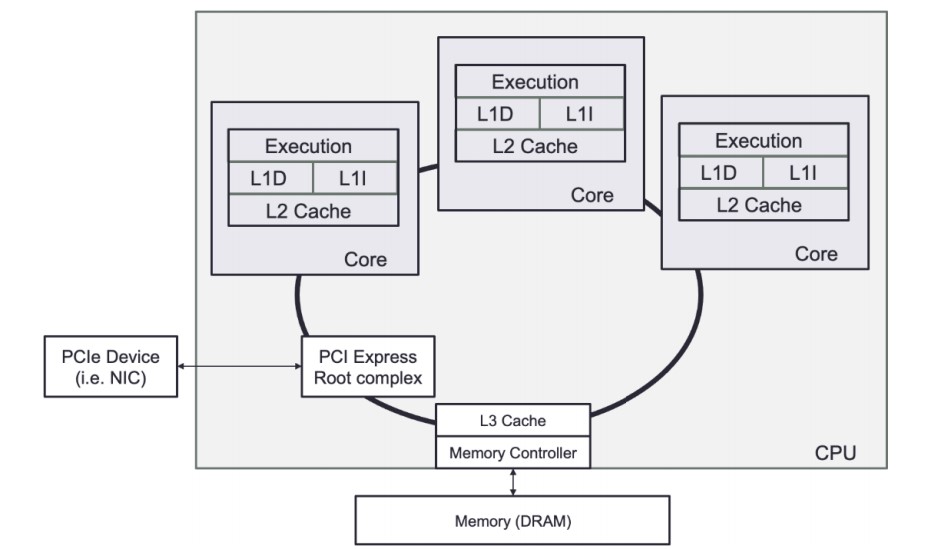
A CPU is a collection of one or more processor cores that fetch and execute program instructions.
- These instructions can act on data stored in memory or interface with a connected device. These devices, often called input/output (I/O) devices, connect to the CPU over some expansion bus, such as PCI Express (PCIe).
CPU Core Functions
-
Logical Operations:
- The CPU core is very good at performing many small logical operations. For example, the CPU can perform basic arithmetic operations (add, subtract, multiply, and divide) and logical operations (AND, OR, NOT, XOR, and bit shifting).
-
Specialized Operations:
- Modern CPUs include specialized instructions for specific tasks:
- CRC32: Cyclic Redundancy Check computation.
- AES: Advanced Encryption Standard algorithm steps.
- Carry-less Multiplication: Instructions like PCLMUQDQ for efficient polynomial multiplications.
- Modern CPUs include specialized instructions for specific tasks:
-
Data Handling:
- CPUs interface with memory and I/O devices to fetch, load, and store data.
- Data transfers occur over expansion buses like PCI Express (PCIe).
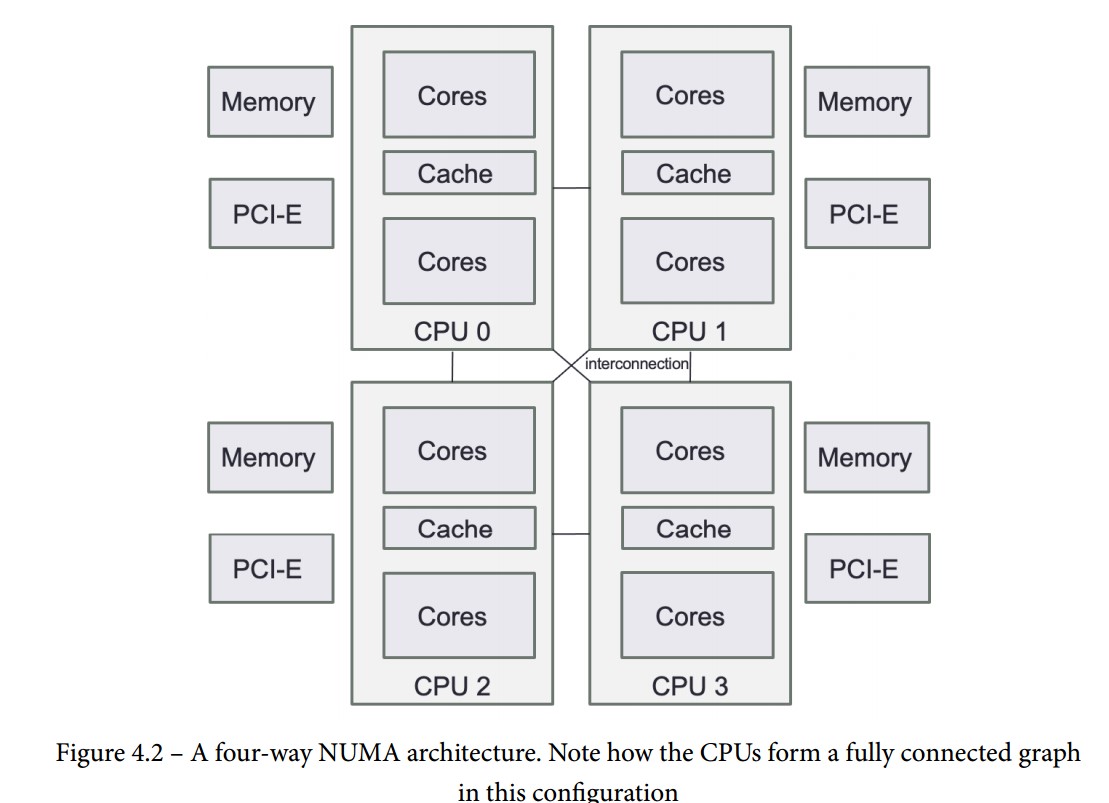
- When there is more than one CPU present in a NUMA architecture, additional CPUs are capable of sharing data by requesting it over the interconnect bus.
-
Control Flow Instructions:
- Control the execution path of the CPU based on calculated or read information.
- Fundamental for implementing high-level constructs such as conditional statements (if-else) and loops (for, while).
Evolution of CPUs
-
Multi-Processor Systems:
- Initially, achieving multi-processing required multiple physical CPU chips in a single computer.
- These systems allowed for concurrent execution of instructions by using multiple processors.
-
Multi-Core Systems:
- With the limits of Moore's law, CPUs evolved to include multiple cores on a single silicon die.
- Each core can independently fetch and execute program instructions.
- Multi-core CPUs provide better performance and efficiency by parallelizing tasks within a single chip.
-
Chiplets:
- As silicon manufacturing advanced, yield issues led to integrating multiple chips (chiplets) within a single package.
- Chiplets can help overcome the limitations of producing larger, monolithic dies by improving manufacturing efficiency and scalability.
Understanding Hyper-Threading / Simultaneous Multithreading (SMT)
Definition:
- SMT is a technique where a CPU maintains multiple parallel execution states. On Intel CPUs, this is known as hyper-threading.
- Each physical core can handle multiple threads (typically two) by switching between them during high-latency operations.
Operation:
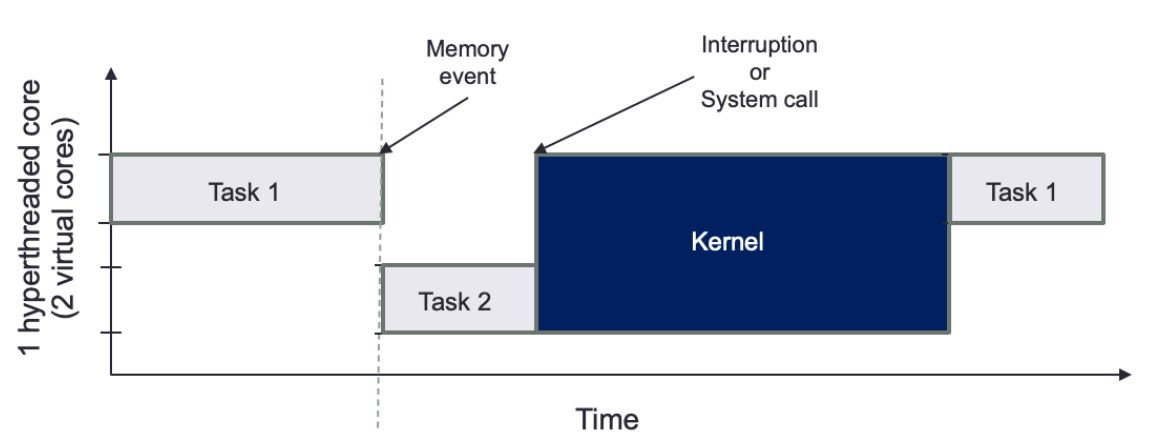
- When one execution state encounters a high-latency event (e.g., data fetch from higher-level cache or RAM), the CPU can switch to another execution state.
- This mechanism allows the CPU to utilize its resources more efficiently, making each physical core appear as multiple virtual cores.
Advantages of Hyper-Threading
-
Increased Throughput:
- Enhances CPU utilization by filling idle cycles with useful work from another thread.
- Can improve performance in multi-threaded applications by making better use of CPU resources.
-
Automatic Threading:
- The CPU manages the switching between threads automatically, reducing the need for complex thread management in software.
Challenges of Hyper-Threading
-
Latency and Jitter:
- Hyper-threading can introduce unpredictable latency, similar to a context switch, when the CPU switches between threads.
- The added latency and jitter can affect the performance of real-time or latency-sensitive applications.
-
Control Over Task Switching:
- Hyper-threading removes control over task switching from the software, potentially leading to higher jitter and unpredictable performance.
- This can be problematic in environments where precise timing and low latency are critical.
-
Kernel Interruptions:
- If a system call or interruption requires access to the kernel, all tasks will be paused, further complicating latency management.
Main Memory (RAM) and Its Role in System Performance
Definition and Characteristics of RAM
- Random Access Memory (RAM):
- Large, volatile memory used to store program instructions and data.
- The primary storage location for data read from I/O devices (e.g., network cards, storage devices).
- Speed: Modern RAM provides high throughput for data bursts.
- Latency: There is an inherent delay (latency) in fetching data from RAM, which can affect performance.
RAM in NUMA Architectures
-
NUMA (Non-Uniform Memory Access):
- Each CPU has its own local RAM.
- Local RAM: RAM directly connected to a CPU, providing faster access.
- Remote RAM: RAM connected to other CPUs, with higher access latency.
-
Configuration:
- Typically, an equal amount of RAM is connected to each NUMA node, but this is not mandatory.
- Accessing remote RAM can significantly increase latency, affecting overall system performance.
Addressing RAM Latency
-
Latency Issues:
- High latency when accessing data from RAM, especially from remote NUMA nodes.
- This latency can impact the performance of applications requiring fast memory access.
-
Use of Caches:
- Cache Memory: Small, fast memory located close to the CPU to buffer frequently accessed data.
- Hierarchy: Includes multiple levels (L1, L2, L3) to reduce latency and improve data access speed.
- Purpose: Caches help hide the latency of RAM access by keeping frequently used data closer to the CPU.
Practical Considerations for HFT Systems
-
Optimizing Memory Access:
- Local Memory: Prefer accessing local RAM to minimize latency.
- Data Placement: Carefully place data to ensure critical data resides in local RAM of the CPU executing the code.
-
Using Caches Effectively:
- Cache Management: Optimize the use of cache memory to store frequently accessed data.
- Prefetching: Implement prefetching techniques to load data into cache before it is needed.
-
NUMA-Aware Programming:
- NUMA Nodes: Design applications to be aware of NUMA nodes and optimize memory allocation accordingly.
- Memory Binding: Bind memory allocations to specific NUMA nodes to ensure data is close to the CPU processing it.
Caches in Modern Processors
- Local and Shared Caches:
- Local to each core
- Shared by all cores on a single socket
- Designed to exploit spatial and temporal locality of data access to reduce RAM access latency
Cache Levels and Structures
-
L1 Cache:
- Fastest, closest to CPU execution units
- Divided into data cache and instruction cache
- Size determined by CPU vendor
- Data cache: stores data for current CPU processes
- Instruction cache: stores CPU operation instructions
-
L2 Cache:
- Slower than L1 but larger
- Size: typically 256 KB to 8 MB, often >8 MB in modern CPUs
- Faster than RAM (approx. 25 times)
- Shared by cores, used for storing frequently accessed data
-
L3 Cache:
- Largest and slowest cache
- Acts as a global memory pool for all cores
- Victim cache: holds lines evicted from L1 and L2
- Fully associative, placed in the refill path of CPU cache
Cache Structure Details
- Cache Line:
- Stores multiple words for efficient data retrieval
- Eviction based on least-recently-used or other schemes
- Different levels of cache have varying line sizes
- Proper data structure alignment to cache line size increases cache hit probability
This structure optimizes data access speeds, balancing between quick access (L1) and larger capacity (L3).
Shared Memory Systems
-
Overview:
- Illusion of a single memory pool accessible by all CPUs
- Programs on any CPU can access memory attached to other CPUs as if it were local
-
Shared Memory Models:
- Uniform Memory Access (UMA):
- Single memory controller
- All CPUs communicate through this controller
- Common bottleneck: shared bus congestion as CPUs increase
- Non-Uniform Memory Access (NUMA):
- Multiple memory controllers, each with its own connected memory
- Scales better with more CPUs due to simpler interconnection of NUMA nodes
- Avoids shared bus congestion issues
- Uniform Memory Access (UMA):
-
Modern Implementations:
- All modern multi-socket servers use NUMA architectures
- Each CPU socket has its own memory pool
Cache Coherency in NUMA Systems
-
Issue:
- CPUs might cache outdated data versions or modify remote memory
-
Solution:
- Cache coherency protocols:
- Ensure CPUs know if they own, share, or modify specific memory regions
- Share information among CPUs accessing the same memory
- Cache coherency protocols:
-
Design Considerations:
- Applications should minimize the need for these protocols due to high synchronization costs
- Particularly important in latency and throughput-sensitive applications
I/O Devices in High-Frequency Trading (HFT)
-
Types of I/O Devices:
- Hard drives
- Printers
- Keyboards
- Mice
- Network cards (critical in HFT)
- Other peripherals
-
Primary Device in HFT:
- Network card
-
Hard Disk Usage:
- Limited use in HFT due to high access costs
- Mainly used for storing data for backtesting trading strategies
- Data storage for backtesting requires specific structuring for fast access
-
Connection to CPU:
- Peripheral Component Interconnect Express (PCIe):
- Standard for connecting I/O devices to CPU
- Devices are directly related to specific CPUs in a NUMA setup
- Peripheral Component Interconnect Express (PCIe):
-
Considerations for Trading Systems:
- Ensure networking code is local to the CPU connected to the network device
- Minimizes latency
- which CPU your networking code (such as market data gateway), is keeping local to the CPU that the network device is connected to minimize latency
Steps to Achieve This
-
NUMA Node Affinity:
- Bind Network Interface: Bind the network interface to a specific NUMA node. This ensures that the network traffic is handled by the CPU and memory local to that NUMA node.
- Bind Application Threads: Pin the threads of your market data gateway to the same NUMA node as the network interface. This minimizes the latency by avoiding the need to access memory on remote NUMA nodes.
-
Network Interface and CPU Binding:
-
Using
numactl: Usenumactlto bind the network interface and application threads to a specific NUMA node.# Bind network interface eth0 to NUMA node 0 numactl --cpunodebind=0 --membind=0 ./your_network_app -
Using
taskset: Bind the application to specific CPU cores.# Bind application to CPU cores 0-3 taskset -c 0-3 ./your_network_app
-
-
Example Code for NUMA-Aware Trading System (non-confirmed)
#include <numa.h>
#include <thread>
#include <iostream>

void process_market_data() {
    // Set CPU affinity for this thread to NUMA node 0
    numa_run_on_node(0);
    // Processing logic for market data
}

int main() {
    // Initialize NUMA
    if (numa_available() < 0) {
        std::cerr << "NUMA not available on this system" << std::endl;
        return 1;
    }

    // Set memory policy to prefer local memory on NUMA node 0
    numa_set_localalloc();

    // Launch threads for processing market data
    std::thread t1(process_market_data);
    std::thread t2(process_market_data);
    t1.join();
    t2.join();

    return 0;
}
Using the OS for High-Frequency Trading (HFT) Systems
-
Role of the OS:
- Provides an abstraction layer over hardware
- Manages the execution of software, memory, and device access
-
Key OS Functionalities:
- Abstracting Access to Hardware Resources:
- Simplifies interaction with hardware
- Process Scheduling:
- Manages CPU time for processes
- Critical for HFT systems to ensure minimal latency
- Memory Management:
- Allocates and manages system memory
- Data Storage and Access:
- Provides methods for storing and retrieving data
- Communication:
- Facilitates communication with other computers
- Interruption Management:
- Handles interrupts from hardware devices
- Abstracting Access to Hardware Resources:
-
Techniques to Reduce Latency:
- Bypass OS abstractions to interact directly with hardware where necessary
- Optimize process scheduling for minimal latency in HFT applications
User Space and Kernel Space in Operating Systems
-
Kernel:
- The core of the OS, highly privileged
- Sits between applications and hardware
- Manages networking, communication protocol stacks, and device drivers
- Capabilities:
- Read/write arbitrary physical memory addresses
- Create/destroy processes
- Alter data before it reaches applications
- Security: Only trusted code runs in the kernel context (kernel space)
-
User Space:
- Where applications run
- Separate virtual memory space with multiple threads
- Less privileged than kernel space
- Requires kernel support for:
- Device access
- Physical memory allocation
- Machine state alterations
-
Objective in HFT context:
- Maximize the execution of critical trading system code by minimizing overhead and latency
-
Challenges
- Minimizing abstractions between hardware and trading system
- Reducing code execution for data format conversion
- Avoiding unnecessary context switches to the kernel or other processes
- Limiting unnecessary hardware state changes
Process Scheduling and CPU Resource Management
-
Software Execution Process:
- Software compiled and stored on durable storage (SSD or hard disk)
- When launched, OS creates processes
- OS loads software into main memory, creates virtual memory space, and invokes a thread to execute the code
- Combination of running software, virtual memory, and threads is called a process
-
Process Scheduling:
- Scheduler determines where and when threads of a process execute
- Manages execution across multiple CPU cores and sockets
- In multitasking environments, scheduler restricts thread execution time (timeslice) and performs context switches
- Context switches save and restore execution environments, which are expensive operations
-
Types of Multitasking:
- Preemptive Multitasking:
- Implemented in Linux and most OSs
- Ensures no single process monopolizes the CPU
- Scheduler stops a process after its timeslice expires
- Allows for global processing decisions
- NUMA-aware execution is challenging
- Cooperative Multitasking:
- Process runs until it voluntarily yields control
- Common in real-time OSs for latency-sensitive tasks
- Available in Linux for real-time applications with careful use
- Preemptive Multitasking:
-
Scheduler Tuning Mechanisms:
- Per-process guidance:
- Prioritization
- NUMA and execution unit affinity
- Memory usage hints
- I/O priority rules
- Real-time scheduling rules for specific task groups in Linux
- Careful use needed to avoid priority inversions or deadlocks
- Per-process guidance:
-
Default Scheduler Fairness:
- Ensures each request is granted within a predetermined time
Memory Management
-
Execution Requirements:
- Software instructions and data must be available in memory for execution.
- OS directs the CPU on memory allocation for each process.
-
OS Responsibilities:
- Track allocated memory regions.
- Map memory to each process.
- Determine memory allocation size for each process.
-
Address Spaces:
- Physical Address Space:
- The actual physical memory available on the computer.
- Managed by the Memory Management Unit (MMU).
- Virtual Address Space:
- Subdivided portions of physical address space allocated to executing processes.
- Allows each process to operate in its own separate memory space.
- Physical Address Space:
-
Memory Management Unit (MMU):
- Maps virtual addresses to physical addresses in real time.
- Ensures the CPU can quickly determine the corresponding physical address for any given virtual address.
Key Concepts
-
Physical Address:
- The actual location in physical memory.
-
Virtual Address:
- The address used by processes, mapped to physical addresses by the MMU.
- OS uses virtual memory to protect processes from one another.
- Each executable runs in its own isolated virtual address space, ensuring process separation and security.
-
Memory Mapping:
- The process of converting virtual addresses to physical addresses.
- Essential for efficient and fast memory access by the CPU.
Paged Memory and Page Tables
-
Memory Management in Modern OSs:
- OS focuses on pages, the basic unit of memory.
- Pages: Uniformly sized regions of physical memory.
- Page size: Determined by the CPU architecture.
-
Page Mapping:
- Memory Management Unit (MMU) maps pages to virtual addresses.
- Virtual address space: Allows applications to ignore physical memory management.
- Each process has its own page mappings, stored in a page table.
-
Page Tables:
- Structure holding page mappings for each process.
- Allows multiple threads or CPU cores to access the same physical page within their address spaces.
Translation Lookaside Buffer (TLB)
-
Address Translation:
- Physical and virtual address translation done by CPU hardware.
- Page tables stored in CPU registers when small enough.
- Larger page tables use the TLB for caching translations.
-
TLB:
- Special-purpose high-speed cache in the CPU.
- Holds page table entries to speed up address translation.
- When a TLB cache miss occurs, the OS must load data from memory, affecting performance.
Impact of Paging on Performance
- Performance Considerations:
- TLB cache misses require memory access, slowing down the process.
- Huge Pages:
- Larger than standard 4 KB pages.
- Can increase memory speed for large datasets.
- TLB for huge pages is smaller, leading to potential frequent memory access.
- Must be used with care to balance performance benefits and potential costs.
System Calls
-
Definition:
- A system call is a request from a user space application to the OS kernel for a service.
- It allows applications to communicate with the OS and perform sensitive actions.
-
Purpose:
- Perform actions such as hardware manipulation, process creation/termination, file management, I/O device management, and communication.
-
Execution:
- The kernel checks if the system call request is allowed.
- If allowed, the kernel performs the operation.
- The application receives a response upon successful completion.
- The kernel transfers data from kernel space to user space once the system call is complete.
-
Scheduling:
- The scheduler resumes the requesting task if it has time left in its timeslice or no higher priority tasks are waiting.
- Some system calls complete in nanoseconds (e.g., getting the system date and time).
- Longer system calls (e.g., network device connections or disk interactions) may take seconds.
- Most OSs use separate kernel threads for each system call to avoid bottlenecks.
Concurrent Execution and vDSO
-
Concurrent Execution:
- Multi-threaded OSs can handle multiple system calls simultaneously.
- Critical for HFT systems to leverage concurrent execution using threads.
-
Virtual Dynamic Shared Object (vDSO):
- Modern Linux provides vDSO for exporting special kernel space functions to user space.
- Example:
clock_gettimefor retrieving system time. - vDSO functions execute directly in user space, avoiding a full context switch into the kernel.
- Reduces overhead for specific calls like retrieving current system time, making them faster and more efficient.
Threading
-
Threads and Parallelism:
- A thread is the most fundamental unit of work in a process.
- Multiple threads enable parallelism within a single process.
- All threads in a process share a common virtual memory space.
-
Processes:
- A process consists of one or more threads.
- Each process has its own unique memory space.
- In trading systems, processes and threads must efficiently share data to make order decisions.
-
Data Sharing:
- Between Threads:
- Threads can share data easily using pointers in a common memory space.
- Concurrency in memory allocation allows efficient data sharing.
- Between Processes:
- Requires shared memory pools or message serialization into queues.
- Between Threads:
-
Advantages of Threads:
- Faster response time compared to processes.
- Quicker context switch times than processes.
- Immediate return of output as threads complete execution.
-
System Calls and Optimization:
- HFT systems rely heavily on system calls.
- Offset system call costs by optimizing the use of threads and processes.
Interruption Management
-
Interrupt Requests (IRQs):
- Peripherals use IRQs to alert the CPU when an event occurs.
- CPU halts one of the processing cores to switch context to the interrupt handler for the device.
- Frequent interrupts lead to increased context switches, impacting performance.
-
Impact on CPU Time:
- Interrupts cause the scheduler to switch between user tasks and interrupt context in the kernel.
- More time spent on servicing interrupts means less time for user tasks.
-
Optimization Strategy:
- Pinning tasks to specific CPU cores can reduce context switches.
- Reduces the impact of kernel interruptions on user task execution.
- Assumes interrupts are serviced by a single core, so only the pinned task on that core is disrupted.
Visualization of Task Scheduling and Kernel Interruption
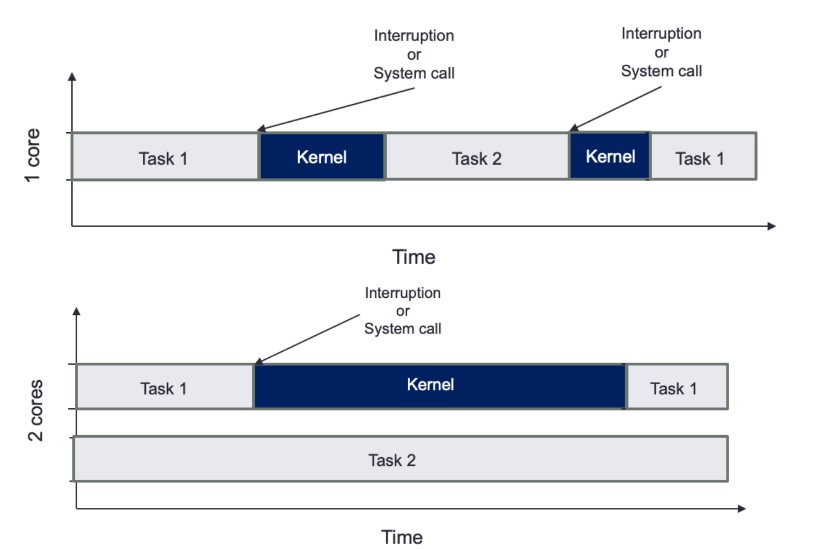
-
Single Core:
- Tasks and kernel interruptions share the same core, leading to frequent context switches.
- User tasks are repeatedly interrupted, reducing CPU time available for task execution.
-
Dual Core:
- Core 1 handles Task 1 and kernel interruptions.
- Core 2 runs Task 2 without interruptions, maximizing execution time.
- Pinning tasks to specific cores minimizes context switches and optimizes performance.
The Role of Compilers
-
Purpose of Compilers:
- Translate human-readable code (source language) into machine-specific language.
- Convert high-level language to intermediate code, assembly languages, object code, or machine code.
- Improve software runtime efficiency.
-
Evolution and Impact:
- Compilers continuously enhance abstraction and efficient hardware execution.
- New programming paradigms, such as object-oriented programming, were popularized by languages like Python and Java in the 1990s.
Optimization in High-Frequency Trading (HFT) Systems
-
Focus on Loops:
- Compilers optimize loops, a critical part of HFT code.
- Space-time tradeoff is key: increase memory usage and cache utilization while decreasing execution time.
-
Examples of Optimizations:
-
Loop Unrolling:
- Reduces the number of iterations and overhead of exit checks.
- Fewer branch instructions, potentially reducing overhead.
- Fully unrolled loops have no exit tests, allowing further compiler optimizations (e.g., constant array offsets).
-
Function Inlining:
- Replaces function calls with the actual assembly code of the function.
- Enables further assembly code optimizations.
-
Table and Calculation:
- Compilers can create data structures to store pre-calculated values.
- Avoids repetitive recalculations, improving efficiency.
-
Executable File Formats
-
Conversion Process:
- Compiler and linker convert high-level programs into executable file formats suitable for the target OS.
- The OS parses these files to load and run the program.
-
Common File Formats:
- Windows:
- Portable Executable (PE)
- Linux:
- Executable and Linkable Format (ELF)
- Windows:
-
Role of the OS Loader:
- Determines which parts of the program on the disk are loaded into memory.
- Allocates the virtual address range for the executable.
- Initiates execution from the entry point (e.g.,
_startfunction in C), which then calls themainfunction defined by the programmer.
Static vs. Dynamic Linking
-
Static Linking:
- Process:
- Linker includes all application code and dependencies into a single binary object.
- Advantages:
- Standalone binary with all dependencies included.
- Allows compiler and linker optimizations for all function calls, including external libraries.
- Disadvantages:
- No reuse of libraries across multiple programs, leading to increased memory usage.
- Example: Multiple statically linked programs using glibc on Linux would store the library redundantly.
- Process:
-
Dynamic Linking:
- Process:
- Linker creates a smaller binary file with stubs where dependent libraries' locations are referenced.
- Dynamic linker loads the required libraries, often at application startup or when needed.
- Advantages:
- Reduces binary size.
- Shared libraries' code can be reused across multiple running processes, saving memory.
- Disadvantages:
- Indirect library function calls via the Procedure Linkage Table (PLT), adding overhead.
- Frequent calls to short library functions can incur significant overhead.
- Process:
Choosing Linking Method in HFT Systems
- Typical Use:
- Static Linking:
- Preferred in HFT systems to avoid overhead from indirect library function calls.
- Ensures maximum performance by eliminating indirection and optimizing all code.
- Static Linking: